

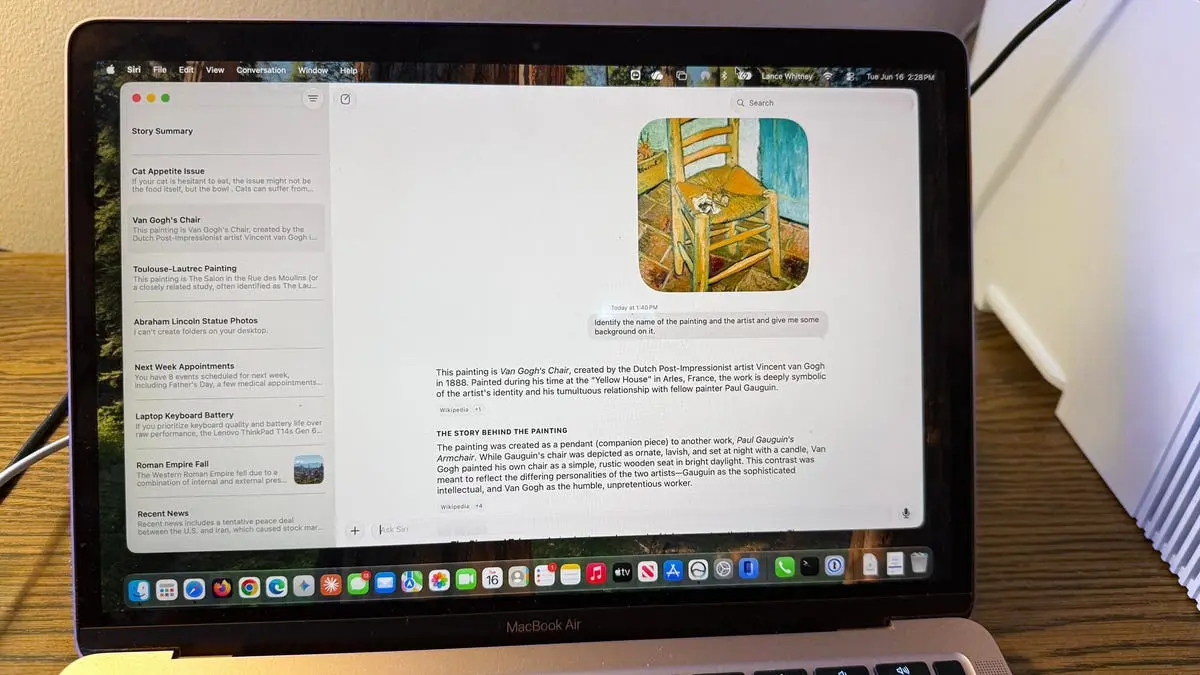
As an iPhone and Mac user, I have long complained about the many faults and flaws of Siri. That is why I was eager to test the new Siri AI that Apple unveiled at WWDC 2026 earlier this month. Available by waitlist for supported devices running the 27 developer beta, Apple promises a more conversational, more responsive, and less error-prone virtual assistant. To see if that holds true, I subjected Siri AI to the same ten tests I regularly run on ChatGPT and Gemini – and the results were mixed.
Getting started with Siri AI on Mac
Joining the waitlist requires a compatible device, installation of the developer beta (preferably on a spare machine), and patience. I joined on my iPhone and remained stuck, but my MacBook Air M1 gained access relatively quickly. Once approved, the new Siri can be invoked via voice ("Hey Siri" or "Siri"), the dedicated Siri AI app icon, double-pressing the Command key for a text window, or right-clicking on any item and selecting "Ask Siri." This integration is deeper than classic Siri and mirrors some of the convenience found in Copilot and Google Assistant.
1. What's new?
First test: a simple question about recent news. Siri AI responded with a rundown of top headlines, read aloud and displayed as bullet points with source links. Unlike ChatGPT, which might engage in chit-chat, Siri AI kept the interaction strictly informational — exactly what an assistant should do. No personality, no fluff, just news. This felt efficient, though users accustomed to a more conversational style might find it dry.
2. Why did the Roman Empire fall?
A classic general knowledge question. Siri AI provided a short spoken explanation followed by bullet-point causes: economic decline, military overspending, political instability, and barbarian invasions. It cited sources with clickable links. The depth was about equal to what ChatGPT offers, though Gemini sometimes adds more context and multimedia suggestions. Siri AI's answer was accurate but brief — sufficient for a quick query but lacking the nuanced analysis power users sometimes require.
3. What laptop should I buy?
I set a scenario: $2,000 budget, prioritize keyboard quality and battery life over performance. Siri AI initially only returned links to articles and social media posts without summarizing them. Disappointing. I then asked it to "summarize and give your opinion." This second prompt triggered a much better response: it listed three models (MacBook Air, Dell XPS, Lenovo ThinkPad) with brief justifications. This inconsistency is a reminder that prompt engineering still matters with Siri AI, more so than with ChatGPT which often extrapolates user intent.
4. Show me my appointments
Device integration test: Siri AI correctly retrieved and displayed all my scheduled appointments for the next week from the Calendar app. No errors. This task was flawless and demonstrates the strength of Apple's ecosystem integration — a clear advantage over third-party assistants that rely on APIs.
5. Find certain photos
I asked Siri AI to find photos of the statue of Abraham Lincoln in my Photos library. It found only three out of six. Repeating with other specific details (e.g., "photos of my dog at the park") yielded similarly incomplete results. By contrast, ChatGPT (with vision) or Google Photos can often locate all relevant images. Siri AI's on-device analysis still seems to rely on metadata rather than true visual understanding, leading to missed matches.
6. Control features and settings
"Turn on Do Not Disturb" – Siri AI executed immediately. Turning it off also worked perfectly. This is a strong improvement over classic Siri which sometimes struggled with system commands. The AI now integrates deeply with macOS settings, making it useful for hands-free control.
7. Analyze a file
I uploaded a photo of a Toulouse-Lautrec painting. Siri AI misidentified the artist and the painting name. On a second try with a different Toulouse-Lautrec work, it got the artist right but the title wrong. Only on a third attempt – a famous Van Gogh – did it succeed. This inconsistency reveals that Apple's vision AI is not yet on par with multimodal models like Gemini or GPT-4. For power users who rely on image analysis, Siri AI is not ready.
8. Provide advice
I described my cat Mr. Giggles refusing his usual food. Siri AI responded with helpful suggestions (mix wet food, try different flavors, consult a vet). It even asked a follow-up question about wet vs. dry food. However, the conversation flow felt disjointed because Siri AI stops listening after each response. I had to click the microphone icon every time. This is a stark contrast to ChatGPT's continuous listening mode or Gemini's voice chat, which maintains natural back-and-forth. Apple needs to smooth this interaction before public launch.
9. Analyze what's on the screen
Using the right-click "Ask Siri" option on a full news article, I asked it to "summarize the story." It failed initially, summarizing only visible text. When I rephrased to "summarize the story on the screen," it worked perfectly, providing a concise overview of all key points. This test underscores how precise wording remains critical with Siri AI. ChatGPT and Gemini often infer context better, but Siri AI requires explicit commands.
10. Review and manage past conversations
Siri AI preserves conversation history and syncs across Apple devices. I could rename, pin, open in new window, or delete a chat. I corrected its error about the Toulouse-Lautrec painting — it still responded incorrectly until I explicitly supplied the artist's name. This suggests that Siri AI's memory and learning from corrections are limited. It does not yet adapt as fluidly as ChatGPT which can update its knowledge mid-conversation.
The overall verdict: Siri AI is a meaningful step forward from the old Siri, but it remains several steps behind leading AI chatbots in accuracy, conversational finesse, and multimodal capabilities. Apple has several months to refine it before the expected public release in September. The foundation is solid — deep system integration, privacy-first on-device processing, and a no-nonsense assistant style. But for users accustomed to the polished interactions of ChatGPT and Gemini, Siri AI still feels like a beta product. The potential is clear, but the execution needs work.
Source: ZDNET News