

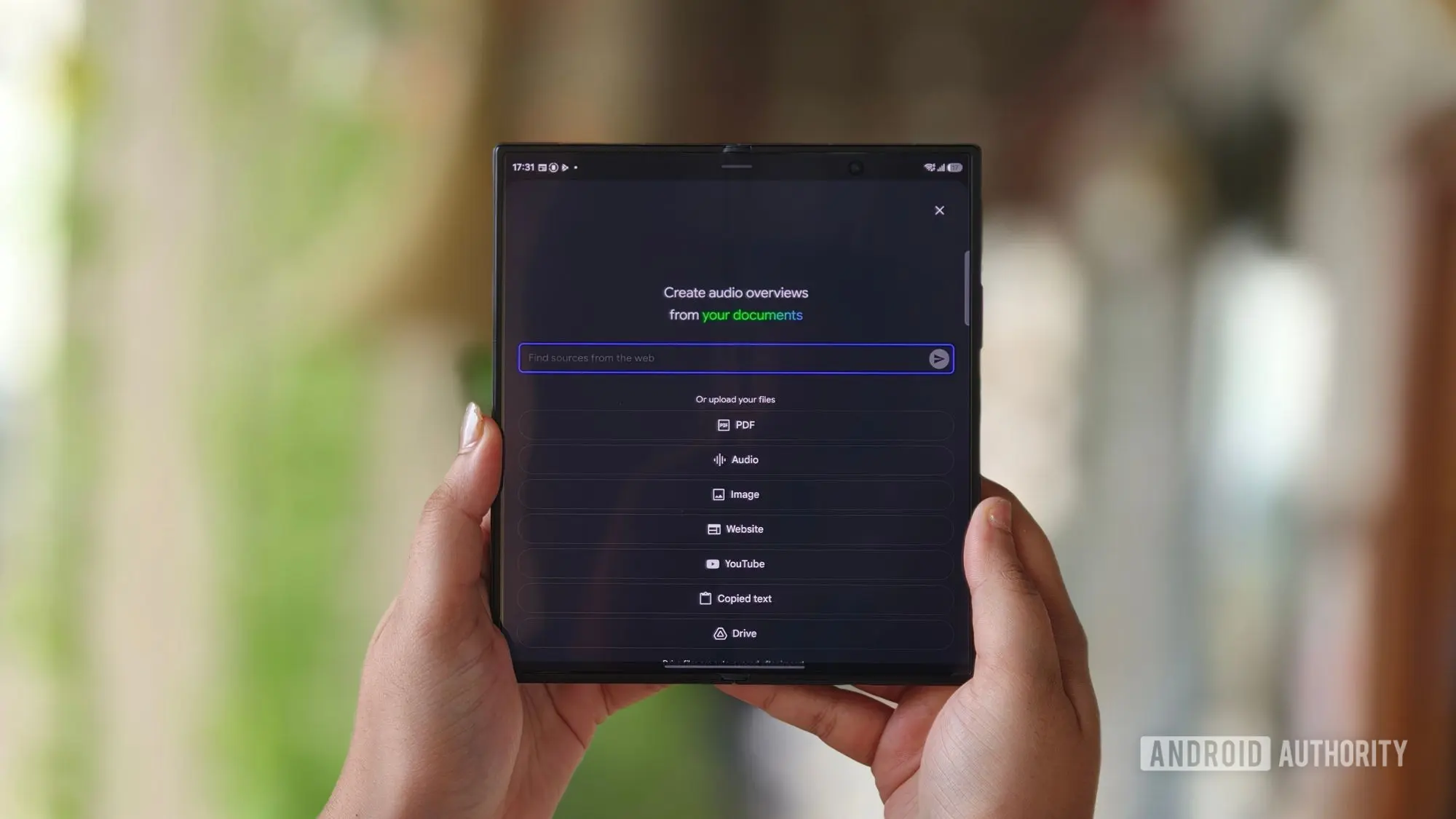
Google is rolling out a new update for Gemini Notebooks that is designed to streamline the way users add sources to their AI-powered research workspace. The update introduces a dedicated "Add a source to Gemini Notebook" step, which automates what has until now been a largely manual process. The goal is to reduce friction for researchers, educators, and business teams who rely on Gemini Notebooks to organize information and generate insights from their own documents and links.
The new feature is already beginning to appear for some users, though the rollout is gradual. According to Google, the deployment started on August 6 and could take up to 15 business days to reach all eligible accounts. The availability also depends on the type of Google Workspace plan a user has, with Business, Enterprise, and Education customers receiving access first. Personal Google accounts will not see the new step at this time.
What does the new "Add a source" step do?
Gemini Notebooks has always been about grounding AI responses in user-provided materials. The new "Add a source to Gemini Notebook" step builds on this concept by making it easier to bring outside content into a notebook. Instead of navigating through several menus or manually uploading files one at a time, users can now use this automated step to add sources more directly.
The supported source types include text, links to Drive files, and generic YouTube or web URLs. This means users can quickly pull in a Google Doc, a web article, or a video transcript and then ask Gemini questions based on that content. The automation is especially useful for those who work with a high volume of references, such as students conducting academic research, analysts tracking product updates, or teams building internal knowledge bases.
Before this update, adding sources required users to go into a notebook and manually attach each file or link. It was a functional but time-consuming process. The new step is intended to remove that overhead by providing a guided, automated workflow that handles source ingestion more efficiently.
Who can use the new feature?
Google has confirmed that the new source automation feature is available for Workspace customers on specific tiers. The rollout covers Business Starter, Business Standard, and Business Plus plans. Enterprise Standard and Enterprise Plus are also included, as are Education Fundamentals, Education Standard, and Education Plus. Users with personal Google accounts will not have access to this particular feature, which suggests that Google is focusing the enhancement on organizational and institutional users first.
The distinction between consumer and business access is not entirely new. Gemini Notebooks has been evolving with different features for different tiers. Automatic Drive syncing, for example, was also rolled out earlier this year, and it has been particularly valuable for teams that need to keep notebook sources current without manual reuploads. The new update extends that philosophy by reducing the effort needed to bring new sources into the system from across the web and Google Drive.
Support for Drive links, YouTube, and web URLs
One of the most useful aspects of the new feature is the range of source types it supports. Users can add plain text directly into the notebook, which is useful for pasting snippets from emails, reports, or internal notes. Links to Drive files allow users to pull in shared documents, spreadsheets, and presentations. Generic YouTube links make it possible to work with video content, while web URLs let users bring in articles, blog posts, and other online resources.
This flexibility means that Gemini Notebooks can serve as a centralized research hub where multiple formats are represented. A user might create a notebook about a specific industry trend, add a competitor's web page, a YouTube analysis video, and a Drive document containing internal research, and then ask Gemini to summarize the key points across all sources. The new automated step makes setting up such a workspace much quicker.
For YouTube links specifically, Gemini Notebooks can process the transcript of the video and use it as a source. That enables users to ask questions about the content without needing a separate transcript file. For web URLs, the system can pull the relevant content from the page and use it in responses, provided the page is publicly accessible.
How the rollout works
Google stated in a blog post that the rollout process began on August 6. As with many Workspace updates, the release will happen gradually over a period of days. Google warns that it could take up to 15 business days from the start date for the feature to become visible across all eligible accounts. Some users within the same organization may see the feature before others.
The gradual rollout is standard practice for Google Workspace updates, as it allows the company to monitor performance and address any issues before the feature reaches a wider audience. For users who are eager to try the new source automation step, it may be worth checking the notebook interface periodically over the next couple of weeks. Google also occasionally posts updates to its Workspace Updates blog when changes like this are complete.
What this means for source management
The new feature is part of a broader trend within Google's AI workspace tools toward automation and context awareness. Rather than forcing users to pre-organize every file before they can engage with the AI, the notebook is becoming more proactive about accepting inputs. The "Add a source to Gemini Notebook" step is essentially a bridge between external content and the AI model. It acknowledges that users often collect information in many forms, and it gives them a streamlined path to bring that information into a single place.
For project-based work, this can be transformative. Imagine a marketing team that is preparing a campaign. They can add a competitor's landing page, a YouTube advertisement from a peer brand, the latest quarterly report stored in Drive, and a piece of text from a customer survey. All of these can be ingested into the same notebook. The team can then ask questions like, "What messaging themes are common across these sources?" or "Which competitor features should we highlight?" The new step removes the friction that would normally come with uploading and linking all these different resource types.
It also gives users more control over the timing of source additions. Because the feature supports automatic ingestion based on a workflow step, users can add sources when they are most relevant, rather than at the beginning of a project. This makes the notebook feel more like a living workspace than a static repository.
Background on Gemini Notebooks
Gemini Notebooks, previously known as NotebookLM, is Google's AI-powered research assistant that allows users to upload sources and then use Gemini models to ask questions, get summaries, and generate insights based on those sources. The application is designed to help people work with their own information, grounding AI responses in material the user has provided. This approach reduces hallucinations and makes the output more relevant to the user's specific context.
The service has gained popularity among students, researchers, writers, and professionals. One of its key differentiators is the ability to cite specific sources within an answer. When Gemini generates a response, it can reference the relevant passage from a source, allowing the user to verify the information. The new source automation step fits naturally into this workflow by making it easier to get content into the notebook in the first place.
Earlier this year, Google introduced automatic Drive syncing to Gemini Notebooks. This feature allowed users to connect files from Google Drive so that any changes made to the original file would be reflected in the notebook. That was a major convenience for users who regularly update their research materials. The new "Add a source to Gemini Notebook" step is another significant improvement because it addresses the initial ingestion process.
Implications for users
The addition of a dedicated source automation step is likely to be welcomed by heavy users of Gemini Notebooks. For small business teams, the ability to quickly add a YouTube video or a web page to a notebook could save several steps per session. For educators and students, linking a Drive document as a source is now more straightforward. The update is also a sign that Google is continuing to invest in the notebook experience as part of its broader Gemini ecosystem.
That said, the exclusion of personal Google accounts may disappoint some individual users. Since the feature is currently limited to Business, Enterprise, and Education customers, hobbyists and independent researchers who use free accounts will have to continue using the manual method. It is possible that Google will expand access in the future, but for now the company is focusing on the enterprise and education segments where team collaboration and shared sources are more common.
Another angle to consider is how the new step could support more advanced workflows. Teams building shared notebooks for projects can now add sources with fewer clicks, making collaboration more efficient. Because the feature supports Drive links, source materials can be maintained in their original locations while still being available to the notebook. This creates a more flexible and dynamic research environment.
From a technical standpoint, the update is relatively simple, but it matters because it lowers the barrier to entry for using Gemini Notebooks effectively. The easier it is to add sources with the right context, the more likely users are to rely on the AI assistant for their knowledge work. In a competitive landscape where AI tools are increasingly evaluated on usability, small workflow improvements can have a large impact.
Google has not provided an exact date for when the rollout will be fully complete, but users should keep an eye on their notebook interfaces over the coming business days. The company also encourages administrators and users to stay tuned to official channels for updates about feature availability and any additional changes to Gemini Notebooks.
Source: Android Authority News